00:00:00 MAC + WINDOWS + LINUX · $99 PRE-LAUNCH
Motion design without the wait.
Brio draws every frame on the GPU, straight from your comp. There's no cache to build and no preview to render, so changing something and seeing it are the same moment.
No subscription. No renewal. No account that expires and takes your work with it.
14 DAYS FREE · NOTHING HELD BACK · MAC · WINDOWS · LINUX
00:00:04 WHY IT FEELS DIFFERENT
All the tools. None of the waiting.
The kit a motion designer reaches for is already in the box. Shape operators like Stamp on Points and Noise Displace, with falloffs you can pin to a null. Pen, pencil and brush. Text animators, a graph editor with real Bounce and Elastic, and a bloom that looks right the first time.
And none of it makes you wait. Most motion tools render your comp into a cache and play the cache back, so every change means waiting for it again. Brio has no cache. Every frame is drawn fresh on the GPU the moment you ask for it: scrub, tweak a value, slide a keyframe, and the viewport is already showing the new version.
When a comp gets heavy, you can still watch it in real time. Set the viewer to Auto and it drops resolution only while it would otherwise drop frames, or pin it to Half, Third or Quarter. Renders always come out at full size.
TOOLS · THE MOGRAPH KIT, BUILT IN
SCRUB · NO GREEN BAR TO FILL
EDIT · RAZOR, SLIP AND SLIDE, BUILT IN
00:00:08 FAMILIAR TOOLS · A DIFFERENT FOUNDATION
You already know how to use it.
Timeline, layers, keyframes, a graph editor. Familiar enough to feel comfortable on the first afternoon, different enough underneath to be worth the switch.
Grab the curve, feel the ease.
Drag a bezier handle and every selected key follows. Bounce and Elastic get real dials — how many bounces, how fast they settle — and the curves you love save as presets.
Group it. Don't pre-comp it.
Hit ⌘G and the folder becomes a layer of its own — animate it, add effects, nest it. Your layers stay right there in the timeline instead of disappearing into another tab.
⌘⇧C still pre-composes, for when that's genuinely what you wanted.
Shapes that never stop being editable.
Repeat, scatter, stamp and boolean your shapes, then skew, pie, wiggle and round them. Fourteen live operators, every number keyable, and it all stays editable right up until you choose to bake it.
2D and 3D in one timeline.
Extrude shapes and type with bevels, pick from 28 materials, light the scene with HDRIs and softboxes, and shoot it through a real lens with depth of field. Same timeline, same layers, same keyframes.
Drop a camera into a 2D comp and it flips 3D on the spot.
Text animators that actually make sense.
Double-click a preset in the Library, pick one from the list, or build your own with controls that say what they do.
Animate position, scale, rotation, opacity, tracking and even variable-font weight by character, word or line. How it rolls across the text is a curve you can drag, starting from shapes like Smooth, Spring and Bounce.
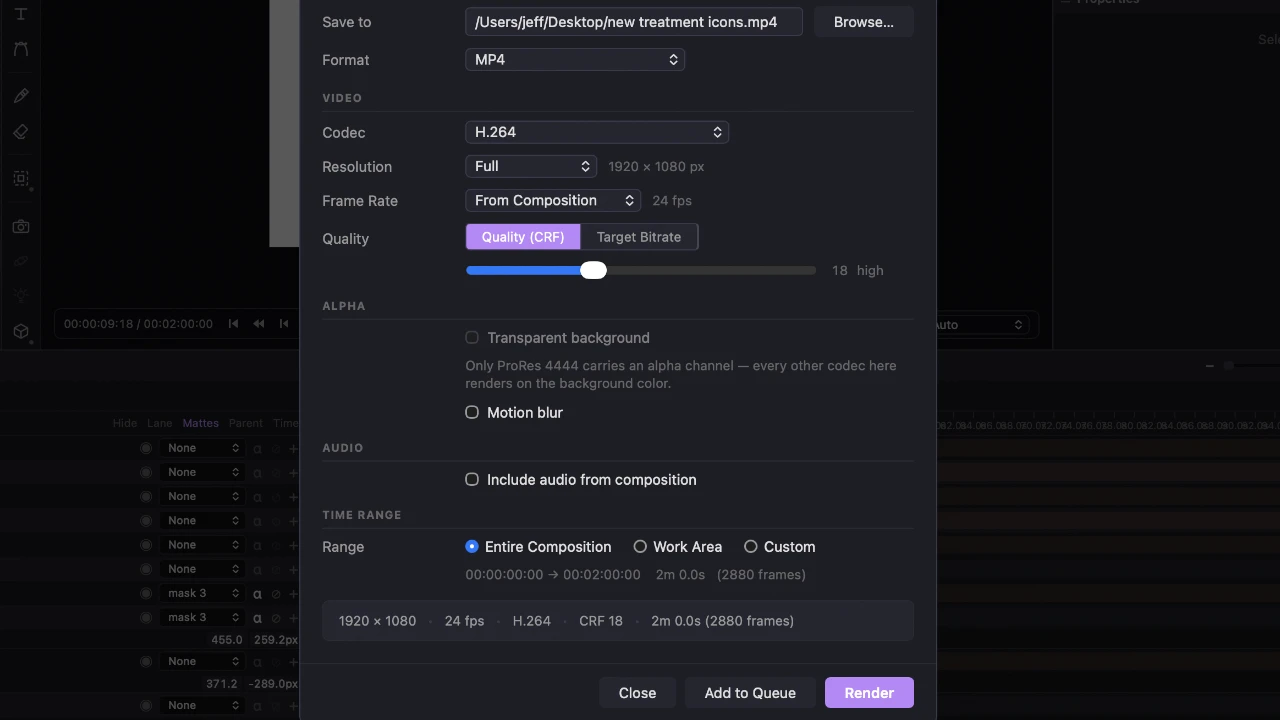
It leaves in the format you need.
H.264 and H.265, ProRes 422 up to 4444 with alpha, GIF, PNG and linear EXR sequences, with motion blur and audio. Lottie and SVG for the web, straight out of the same render queue.
00:00:12 AE → BRIO
Your After Effects work
doesn't have to stay there.
A free script sends your comps to Brio and tells you plainly what it couldn't bring. Free for everyone, forever — you don't need a Brio licence to use it.
00:00:16 THE REST OF THE BOX · 16 FEATURES
Made to be played with.
-
Library
Your favourite looks, one drag away.
Materials, HDRIs, texture sets, 3D objects and light rigs in one panel. Save your own presets once and drag them onto a layer in any project.
-
Folders
Group it, don't pre-comp it.
Group with ⌘G and the folder becomes a layer of its own: animate it, add effects, nest it. Your layers stay in the timeline, and ⌘⇧C still pre-composes when you want that.
-
Geometry Ops
Fourteen live operators. Nothing's final.
Repeat, scatter, stamp and boolean your shapes, then skew, pie, wiggle and round them. Every number keys, and it all stays editable until you bake it.
-
Lottie Export
Motion for websites and apps.
Render shape layers to Lottie JSON with their transform keyframes, easing, parenting and blend modes, then preview the file in lottie-web before it ships.
-
Particles
Sparks, smoke, dust and fire.
Emit from a point, a shape's outline or any layer. Add gravity, wind and turbulence, light them in 3D, or start from 35 presets.
-
Text Animators
Type that moves letter by letter.
Animate position, scale, rotation, opacity, tracking and even variable-font weight by character, word or line. Ten presets get you going.
-
Graph Editor
Grab the curve, feel the ease.
Drag bezier handles on every selected key at once. Bounce and Elastic get real dials, and the curves you love save as presets.
-
Layer Styles
Shadows, glows, bevels and strokes.
Eight styles, from Drop Shadow and Inner Glow to Bevel & Emboss and Stroke, each with its own blend mode and Photoshop's defaults.
-
3D Stage
Extrude it, light it, shoot it.
Extrude shapes and type with bevels, pick from 28 materials, light the scene with HDRIs and softboxes, and shoot through a real lens with depth of field.
-
Figma Import
Paste a link, get a comp.
Every frame arrives as a comp: groups as layer groups, text you can edit, shapes with their fills and gradients, and photos cropped the way they were.
-
COMING SOON
AE Import
Bring your After Effects comps along.
A free script sends your After Effects comps to Brio with their layers, keyframes and easing, and names anything left behind. See how →
-
Modifiers
Wiggle it, drive it, link it.
Stack Wiggle, Linear and Driver modifiers on any property, or pick-whip one value to another, even a font size or an effect setting.
-
Time Remap
Bend time with a curve.
Arm the stopwatch and a clip, precomp or drawing plays to any curve you draw. The audio follows along, in the preview and in the render.
-
Falloff
Drag a circle, watch the copies react.
Add a Falloff to a shape layer's operators and every copy pushes, scales and fades by its distance from a circle you drag on the canvas.
-
Render Queue
ProRes, EXR and friends.
Queue renders to H.264 or H.265, ProRes 422 up to 4444 with alpha, GIF, or PNG and linear EXR sequences, with motion blur and audio.
-
Own it forever
Buy it once. Keep it.
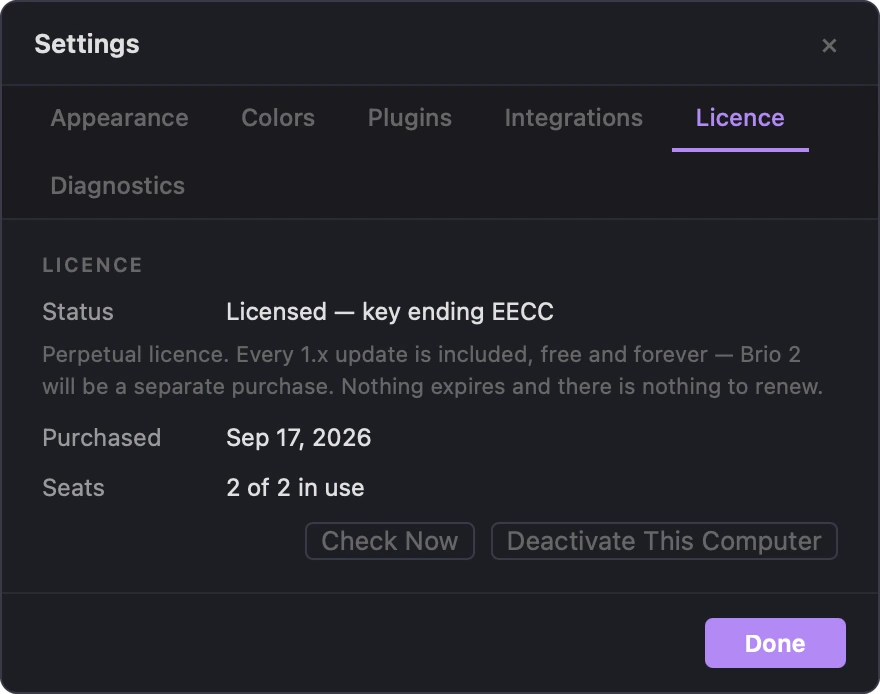
$99 in the pre-launch sale, $299 after launch — one time either way, with every 1.x update included. One licence covers two computers, on Mac, Windows or Linux.
00:00:20 OWN YOUR SOFTWARE
Buy it once. Keep it.
No subscription. No renewal. No account that expires and takes your work with it.
PRE-LAUNCH SALE
$99 was $299
ONE TIME · NOTHING RENEWS · $299 AFTER LAUNCH
- Every 1.x update included
- Runs on Mac · Windows · Linux
- One licence activates 2 computers
- Move a seat whenever you like
- Free trial 14 days
A future 2.0 would be a separate purchase, and you'd keep the version you own either way. When the trial ends nothing locks: the app still opens, edits and saves, and only renders carry a watermark until you enter a key.
00:00:24 WHO MADE THIS
Built by a motion designer.
Not a software company.
I spent years working inside subscription motion tools, and eventually got tired enough of them to build the one I wanted to open every morning.
When you email support, you're emailing the person who wrote the code. There's no tier above me to escalate to, which cuts both ways, and I think it mostly cuts the right way.
Brio is familiar enough to feel comfortable and different enough underneath to be worth the switch. You build comps from shape layers, text, footage and 3D, animate them with keyframes and live operators, and export video, GIF, Lottie or SVG. If you've worked in After Effects you'll find your way around on the first afternoon.
One person, every release
I'm Jeff Russell. I design Brio, build it, and ship every release myself — which is why it moves the way it does, and why the roadmap answers to working motion designers rather than to a quarter. Nothing in here got built because a committee asked for it.
Buy it once
Right now Brio is $99 in the pre-launch sale; at launch it goes to $299. Either way it's one time, and it covers every 1.x release for as long as there are 1.x releases. No subscription, no renewal, no account that expires. A future 2.0 would be a separate purchase, and you'd keep the version you own regardless.
Try it first
The trial is free for 14 days with nothing held back. After that, exports carry a watermark until you enter a licence key. The app never locks you out of your own project.
Your licence, your machines
One licence activates on up to two computers. Deactivate one and move it whenever you like. Licensing and checkout run through Lemon Squeezy, which handles payment and tax worldwide so I can spend the time on the app.
Own your tools
The other one-time-purchase options in this space have been acquired and folded into platforms. Brio is independent, built without GPL or non-commercial dependencies, and will stay that way.
Runs where you work
macOS on Apple Silicon, Windows, and Linux. One licence covers all three, so a desktop on one platform and a laptop on another is exactly what it's for.
On Linux, get the AppImage or .deb from the releases page. It needs Ubuntu 22.04 or Debian 12 or newer, and an Xorg session rather than Wayland.
00:00:28 STAY IN THE LOOP
Join the mailing list.
No spam, just good vibes, plus a note when a new build lands.
✓ You're in. Good vibes incoming.
00:00:32 OUT POINT
Open Brio and make something.
14 days, everything unlocked. No subscription, no account, and nothing locks your projects when the trial runs out.
Con brio — the musical direction for “with spirit.”
Doing something with confidence, style, and spirit. Animate con Brio!